You don't need to open Optioneer
The analysis lives in Optioneer. The decisions happen in a Teams call, a Word document and a slide deck.
Someone asks which options interact with a high-risk constraint. Someone asks what the cost gap is between the two shortlisted corridors, and why. Someone asks whether the northern route still works now the landowner has withdrawn. In most organisations, those questions get written down, assigned to whoever holds the licence, and answered next week — by which point the meeting that needed them has ended and moved on without them.
The Optioneer Agent answers them in the room. Ask in plain language in Microsoft Teams or Copilot, and get the number, the map, the comparison or the written paragraph back while the conversation is still live.
across an option set, available on request
not in next week's actions log
preparing the write-up afterwards
waiting for someone to go and look
What is the Optioneer Agent?
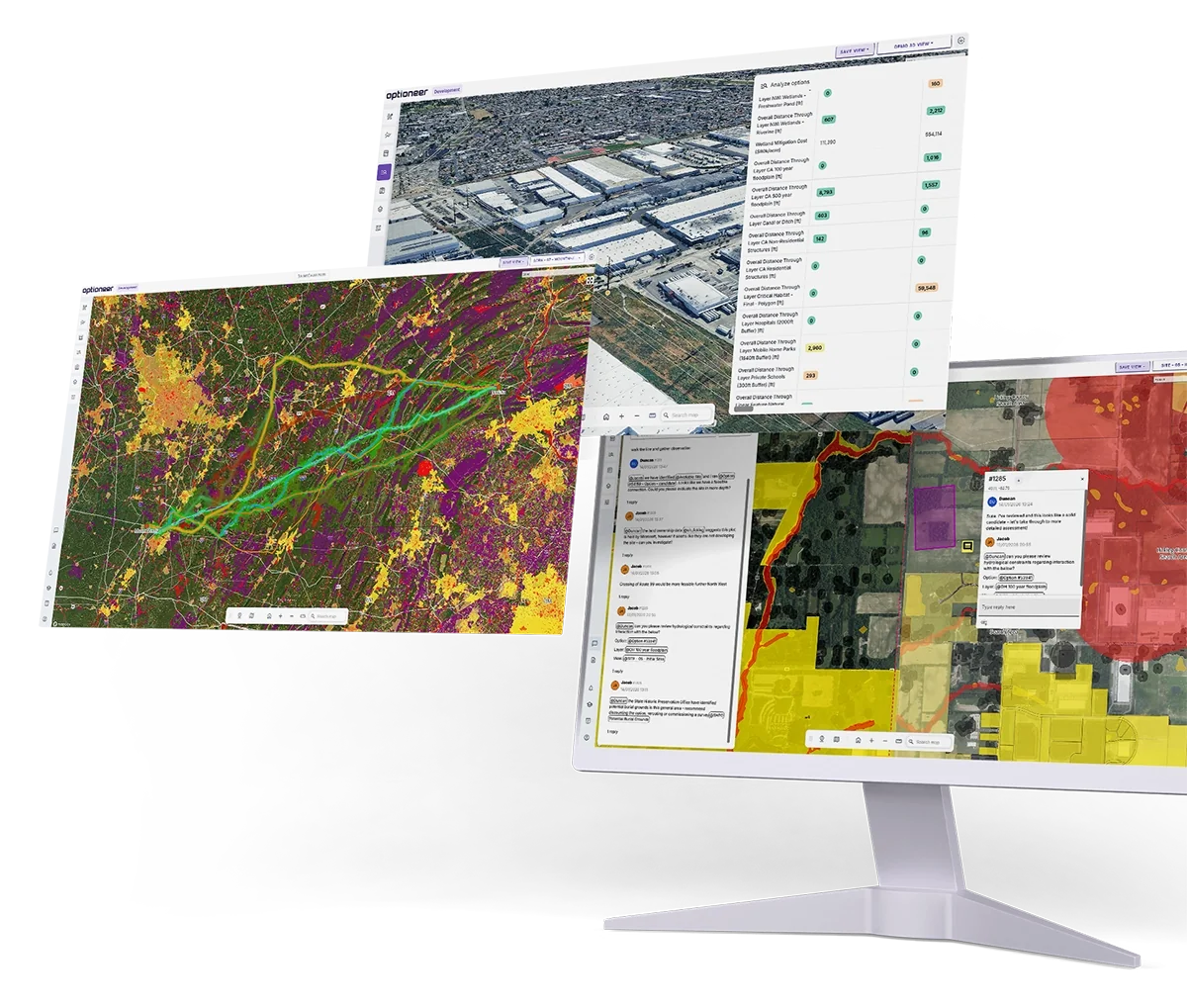
The Optioneer Agent makes infrastructure route and site analysis available inside Microsoft Copilot, Teams and Office Suite — Word, Excel and PowerPoint — so anyone in a project can query live Optioneer projects in plain language without opening the platform or holding specialist skills.
It matters for infrastructure teams for three reasons:
Most people who need the answers are not platform users.
Programme leads, regulatory teams, commercial managers and executives vastly outnumber the specialists working in the platform daily — and they currently reach the analysis through a queue.
The delay is the cost.
Infrastructure decisions stall on waiting: for a question to be assigned, for someone to run it, for the answer to come back in a usable form. Removing that lag is worth more than removing the effort.
Natural language removes the training requirement.
Asking a question is a skill everyone already has. Learning a spatial optimisation platform is not, and never will be, something a programme director will do.
Who this is for
Not primarily the specialists. The Agent is built for everyone around them.
What it looks like in practice
In the meeting, while it still matters
Project meetings run on half-remembered figures and promises to check. A question comes up that nobody in the room can answer with confidence, so it becomes an action, and the discussion continues on assumption — or stops.
With the Agent in Teams, that question gets answered before the conversation moves on. How many dwellings are within a distance on each shortlisted option. What the length difference actually is. Which of the three crosses the flood zone. The meeting keeps its momentum, and the decision is made on the real number rather than on the one someone half-remembers.
The effect is closer to having a colleague in the room who has read everything — someone who can close a gap in shared understanding as it opens, rather than a fortnight later in an email nobody reads.
In stakeholder consultations, in front of the person asking
Consultations are where unanswered questions cost the most. A landowner asks why the route runs through their field rather than the one next to it. A parish council asks whether the alternative they proposed was considered. A statutory consultee asks what happens to the crossing at the eastern end.
Answering “we'll come back to you” is a legitimate response, and it is also the response that erodes confidence and generates correspondence. Being able to pull up the constraint that drove the alignment, or the comparison that ruled the alternative out, changes the character of the conversation — from a body defending a decision to a team showing its working.
In the format the moment actually needs
The same answer is needed in different shapes depending on who is asking. A number in a chat reply. A map to share on screen. A comparison table for a steering group. Three paragraphs for the board paper being drafted that afternoon. A slide for tomorrow's update.
Ask for it in the form you need it. The Agent produces the written summary, the tabulated comparison, or the figures to drop into the deck — without the round trip through export, reformat and re-key that loses fidelity at every hop.
Run the analysis, not just retrieve it
The Agent is not limited to answering questions about work already done. Ask it to explore options between two locations and it will set the analysis running: submitting the case, applying your standard configuration, and reporting back when there are results to look at.
For a lot of early-stage questions — a new connection point someone has just suggested, a corridor an objector has proposed — that turns a task requiring a specialist and a scheduled slot into something initiated from a sentence.
Working alongside Microsoft Office
Most infrastructure output is an Office document, and most of the effort in producing one is moving information into it.

Word
Draft a board paper, a technical note or a consultation response with live figures pulled in as you write, rather than from an export made a fortnight ago. Every number reflects the current state of the project.

Excel
Build an option comparison from current metrics — lengths, constraint interactions, structure counts, costs — with the columns you need rather than the ones a fixed report template offers.

PowerPoint
Assemble a project update or a board slide from the analysis itself, with figures and comparisons drawn from the live project rather than rebuilt by hand each cycle.

Teams
Answer in the thread where the question was asked, so the answer lands in the record alongside the discussion that prompted it.
The practical gain is not just time. It is that documents stop drifting out of date the moment they are written, because the figures in them came from the project rather than from someone's copy of it.
The strategic argument
The adoption problem this actually solves
Every specialist platform has the same ceiling.
A handful of people learn it properly, and everyone else reaches it through them. Licences are not the constraint — capability is, and so is the willingness of a programme director to learn a spatial optimisation interface for the four questions a month they need answered.
Natural language removes that ceiling.
There is nothing to learn, no interface to navigate, and no training to schedule. If you can ask a colleague, you can ask Optioneer — and it arrives in Microsoft Teams alongside every other tool your organisation already uses, rather than as another system to log into.
The consequence
The platform's value stops being bounded by how many people were trained on it. The analysis was always there; what changes is how many people can reach it, and how quickly. For most organisations that is a far larger shift than any individual feature, because it changes who participates in a decision rather than how fast one person works.
It also takes a real load off the specialists. Most internal requests are simple retrieval that happens to require someone who knows where to look — individually small, collectively enormous, and landing on the people who are already the bottleneck.
Where the Agent earns its place
What changes when the analysis is one question away
Where this goes next
From asking to noticing
The natural progression past answering questions is raising them. An agent with standing access to a project can flag what nobody thought to ask: a new constraint dataset that intersects a preferred corridor, a parcel that changed hands, a scheme whose assumptions no longer match the current network plan. Infrastructure programmes run for years and early assumptions are rarely re-checked — that is exactly the gap continuous attention fills.
From one system to the whole workflow
The interesting version is an agent that reaches Optioneer alongside your document management system and project tracker, and carries a task across all three: pull the current preferred option, check it against the commitments register, draft the update, file it where it belongs. Today that is four applications and a person.
From response to preparation
A weekly programme summary assembled before the meeting rather than during it. A stakeholder response drafted the day the objection lands. None of these need a human to start them, and all of them currently wait for one.
Agentic workflows are genuinely early, and the failure mode is well understood: an agent acts confidently on a misreading and nobody catches it before it reaches a submission. Autonomy should follow auditability, not precede it.
The near-term emphasis is deliberately on retrieval, drafting and analysis — where a wrong answer is visible immediately to the person who asked — rather than unsupervised action inside the platform.
How it works
For the technical audience: the protocol, the permission model, the operations and what deployment looks like.
The connection
The Agent is built on the Model Context Protocol (MCP), an open standard for connecting AI assistants to external systems. Optioneer publishes a set of tools; Microsoft Copilot discovers and calls them on the user's behalf.
Copilot supplies the language understanding; Optioneer supplies the data and the actions, and remains authoritative about both. Figures come from real project state rather than from the model's own recall.
Identity and permissions
Access runs through the user's existing Optioneer account and permissions. Someone querying a project through Copilot sees exactly what they would see in the platform, and no more.
There is no parallel permission model to maintain and no separate copy of your data to secure.
Operations available
Retrieve — project and option data, configurations, geometries, metrics and results.
Interrogate — comparisons across an option set, constraint interactions, changes since a previous run.
Act — submit cases and analysis runs, create waypoints to steer a route through or around a point, and audit a project's configuration against an internal standard or external guidance, returning a written assessment of where it diverges.
Deployment
Both UK and US Optioneer instances are supported, so data residency follows wherever your projects already sit.
Read-only deployment is a valid starting configuration, and for most organisations it is the sensible first step.
The Agent is an interface to Optioneer, not a replacement for it. Spatial work is spatial — a route is understood by looking at it, and no conversational interface changes that. Specialists will keep doing routing and siting work in the platform. What changes is who else can reach the results.
Frequently asked questions
Do we need Optioneer licences for everyone using it?
Every Optioneer licence already covers your whole team, internal and external collaborators included. In practice the Agent reaches people who were already covered but were never going to open the platform.
Does it work with anything other than Microsoft Copilot?
Yes. It is built on the Model Context Protocol, an open standard, so it works with any MCP-compatible assistant including Claude. In practice almost all customers run Microsoft 365, so Copilot and Teams are where the Agent is designed to live and where it gets the most attention.
Can it change our project data?
It can perform actions the user is permitted to perform — submitting cases, creating waypoints — under that user's identity. Read-only deployment is equally valid and is where most organisations should start.
How quickly does it answer?
Retrieval and comparison questions return in conversation time, which is what makes live use in a meeting realistic. Starting a new analysis run is different: the Agent submits it immediately and reports back when results exist, but a full optimisation is not instantaneous and should not be promised as such in front of a stakeholder.
Is our project data used to train AI models?
The Agent passes data to whichever assistant your organisation has deployed, so the answer depends on your agreement with that vendor rather than on Optioneer. Worth resolving with your AI provider before deployment — it applies to every agent integration, not only this one.
Can it hallucinate a figure?
Numbers come from real project state, not from the model's recall, so the failure mode is misinterpretation rather than invention. That is why the near-term emphasis is on retrieval and drafting, where a wrong answer is immediately visible to the person who asked, rather than on unsupervised action.
Does it replace using the platform?
No. It extends reach to people and moments the platform was never going to cover.
Can we build our own agent on top of it?
Yes. Organisations building assistants in Copilot Studio or equivalent can connect Optioneer as one of several systems.
How mature is this?
The underlying tooling is in active use for project data retrieval, case submission, waypoint creation and configuration auditing. Breadth of tested clients and depth of the tool surface are still expanding. If you are evaluating it for a specific workflow, bring us the workflow.
Bring us the meeting that keeps stalling
The useful conversation is not about the protocol. It is about the question your team keeps having to take away and answer later. Tell us what it is.
Client success stories
We’ve had the pleasure of working with global leaders in the utilities industry, find out how they achieved results with Optioneer.




























Learn how Optioneer can accelerate your project development programmes

We will be in touch with you shortly.